Rate Limiting Handbook: Algorithms and Best Practices


Rate limiting caps how many requests a client can make to your API or website in a given time, say 100 requests per minute per user. Anything over the limit gets rejected, usually with a 429 Too Many Requests response, until the window resets.
Every public endpoint needs it eventually. One customer's script hammers your API, someone tries a million passwords against your login page, or a scraper walks through every page you have. A rate limiter stops all three before they take down the service for everyone else.
This handbook covers how rate limiters work under the hood, the trade-offs between the common algorithms, and how to pick limits that stop abuse without blocking real users.
The five parts of a rate limiter
Every rate limiter, from a few lines of Redis to a CDN feature, has the same five parts:
- A way to identify who's making the request
- Somewhere to store the counters
- An algorithm that decides whether the request is over the limit
- A response for rejected requests
- Monitoring, so you know who's being limited
1. Identifying the client
The limit applies per something, and choosing that something is the most important decision you'll make.
- IP address is the easiest, and the only option for anonymous traffic. But a whole office or a mobile carrier can share one IP, so a limit that's fine for one person can block hundreds of them.
- API key or token is the fairest for APIs. Each customer gets their own budget, wherever they connect from.
- User ID works for logged-in users across devices.
- A combination, such as IP plus path, or IP plus User-Agent, lets you set tighter limits on expensive endpoints without touching the rest.
Look at how your real users connect before you choose. A B2B API used from a few servers behaves nothing like a consumer app used from phones behind carrier NAT.
2. Storing the counters
The counter store sits on the path of every request, so it has to be fast. It also needs keys that expire on their own, so old windows clean themselves up, and it has to work when you run more than one server.
Redis is the usual choice. INCR is atomic, keys expire with EXPIRE, and it's fast enough to call on every request. Memcached works too. A regular database only makes sense for low-traffic limits you need to keep, like monthly quotas.
At high traffic, even one Redis call per request adds up. One way around it is to count locally and sync in the background:
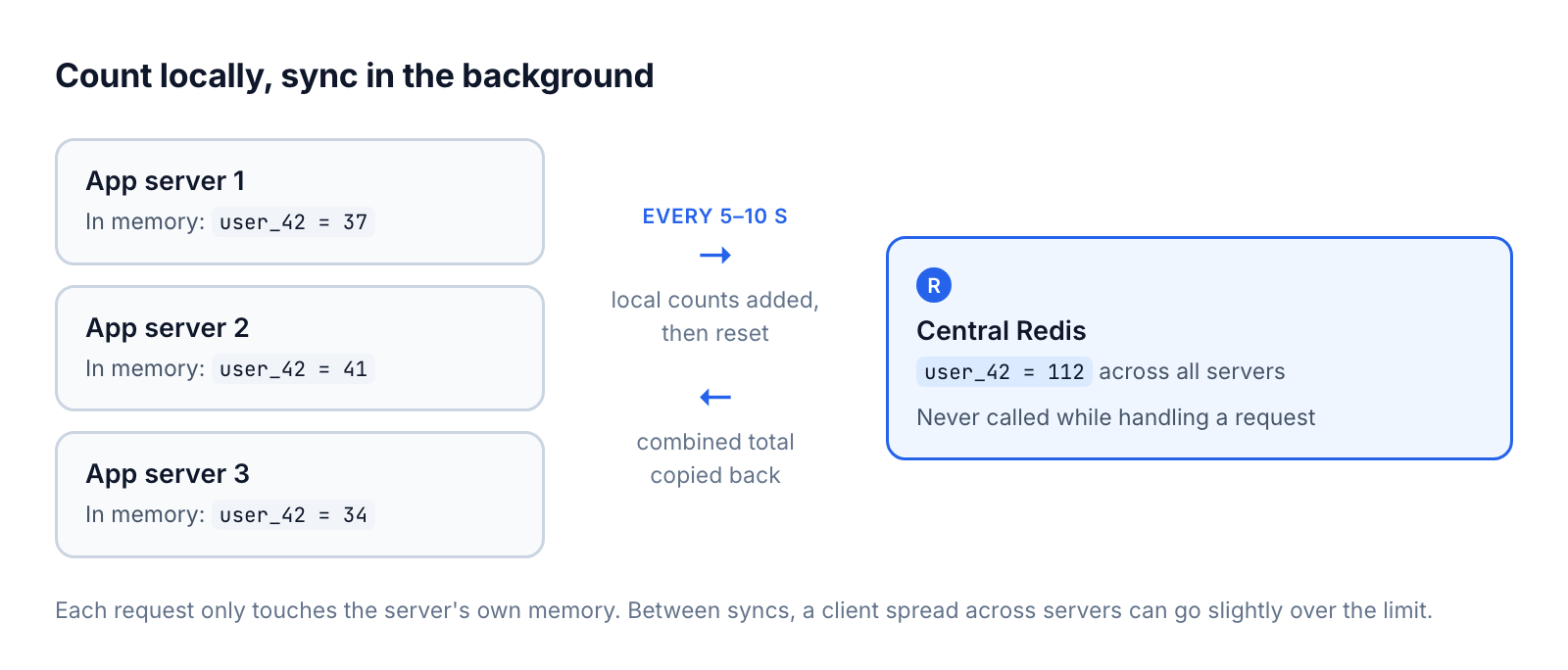
- Each app server keeps an in-memory counter per client and increments it on every request.
- Every 5–10 seconds, a background job adds the local counts to the central Redis counter and resets them.
- The same job copies the combined totals back to each server, so every server knows roughly what the others have counted.
Request handling never waits on Redis this way. The cost is accuracy: between syncs, a client spread across several servers can go a little over the limit. For most APIs that's a fine trade for cutting Redis calls by orders of magnitude.
Some limits do need to be exact, like anything tied to billing or security-sensitive endpoints. Count those directly in Redis, and use local counters for everything else.
3. The algorithm
The algorithm decides how requests are counted over time. There are four common ones.
Fixed window
Split time into fixed windows, like each calendar minute, and allow N requests per window.
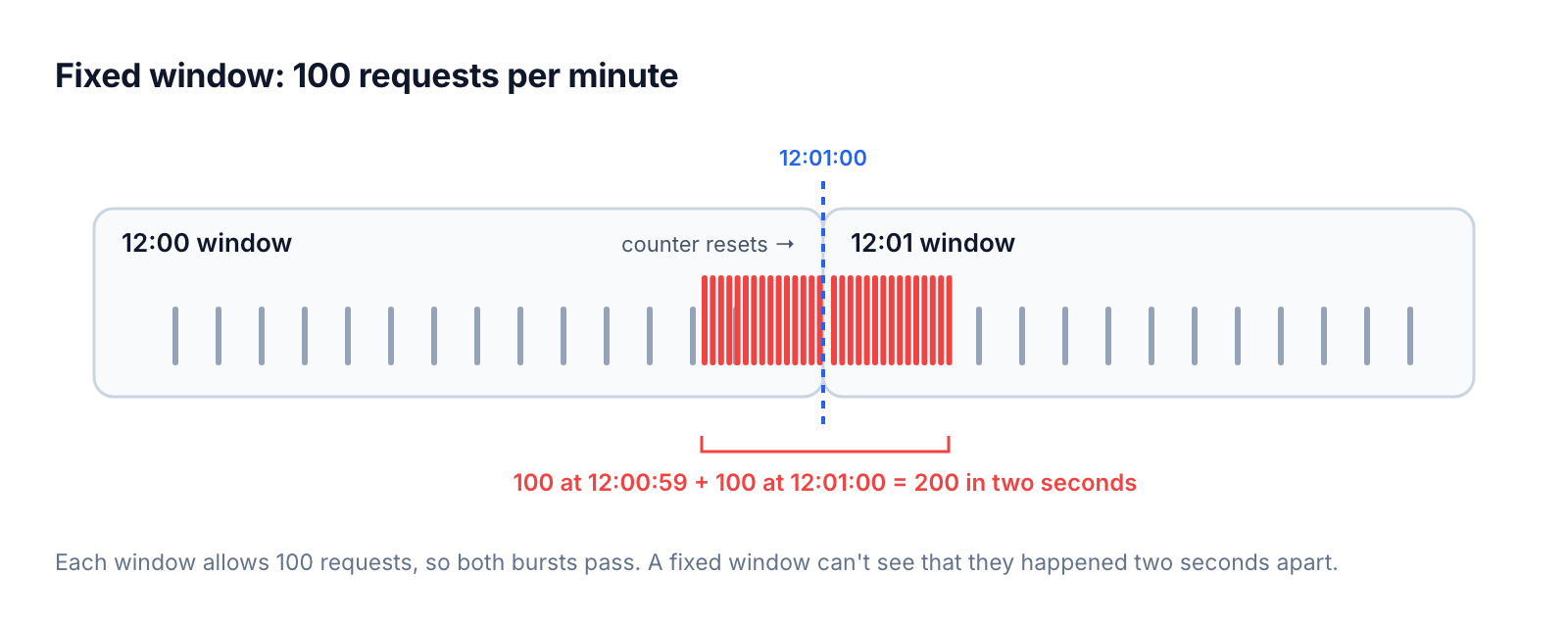
It's simple and needs one counter per client. The weakness is at the boundaries: with 100 requests per minute, a client can send 100 at 12:00:59 and another 100 at 12:01:00, which is 200 in two seconds.
Sliding window
Count requests over the last 60 seconds from now, instead of per calendar minute.
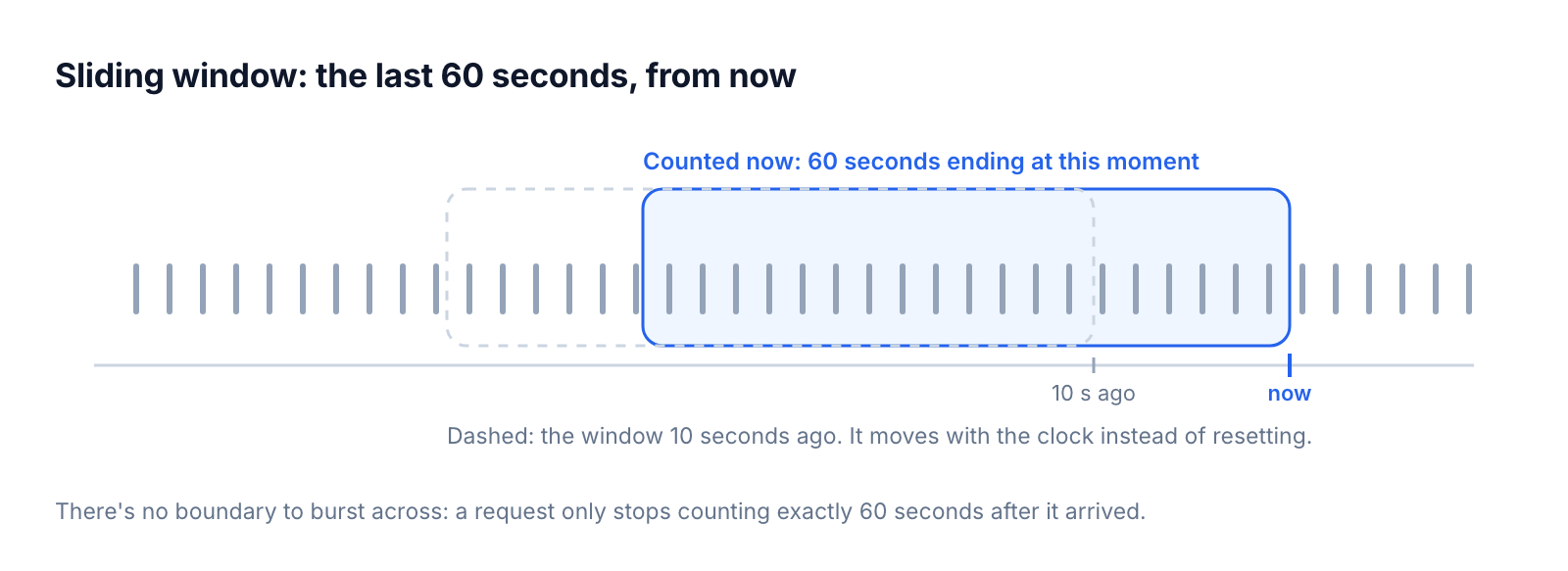
There's no boundary spike, but it costs more. An exact sliding window stores a timestamp per request. The common shortcut, a sliding window counter, weights the previous fixed window's count by how much of it still overlaps, which is close enough for most uses.
Token bucket
Each client has a bucket that holds up to N tokens. Tokens are added at a steady rate, and each request takes one. When the bucket is empty, requests are rejected until it refills.
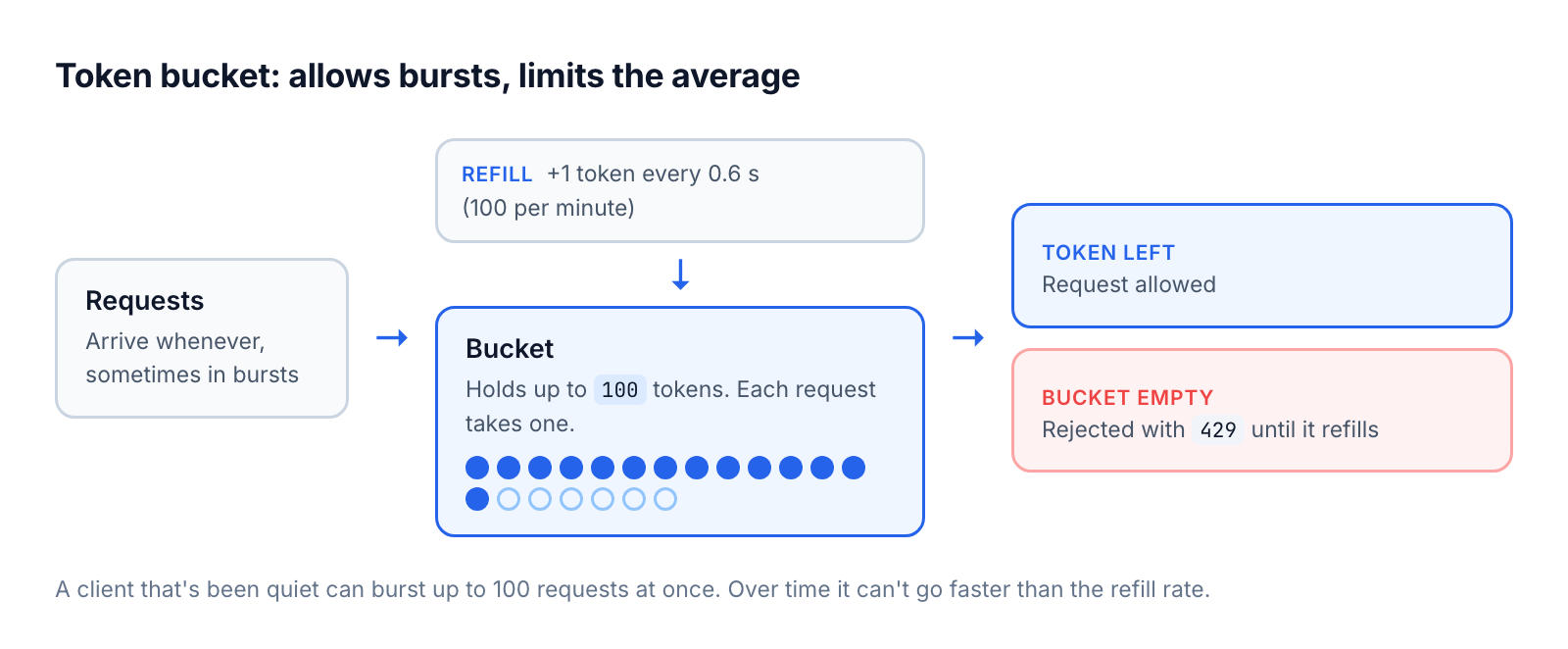
A client that's been quiet can burst up to the bucket size, but over time it can't go faster than the refill rate. That matches how real clients behave, which is why most APIs use it. You do have to tune two numbers, the bucket size and the refill rate.
Leaky bucket
Requests go into a queue that's processed at a fixed rate. If requests arrive faster than that, the queue fills up, and once it's full, new requests are rejected.
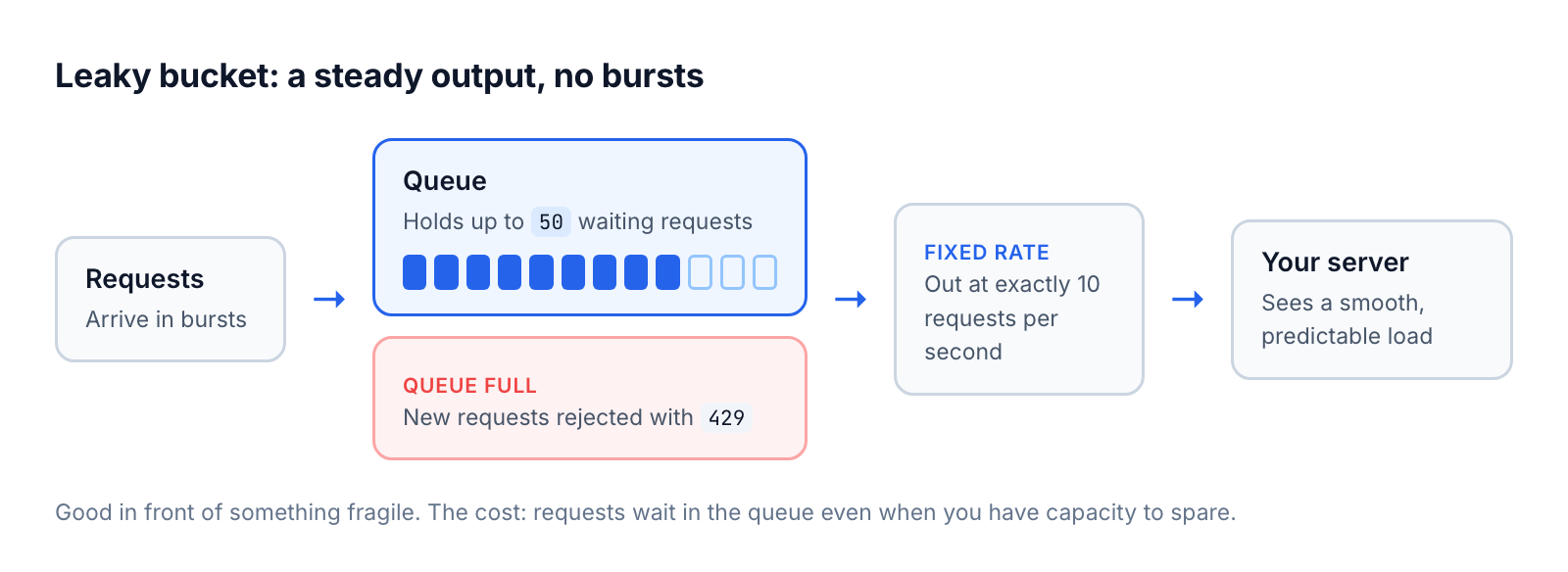
The output is perfectly smooth, which protects a fragile downstream system, like a payment provider with its own strict limits. But it doesn't allow bursts, so legitimate clients wait in the queue even when you have spare capacity.
Token bucket or leaky bucket?
Token bucket limits the average rate and allows bursts. Leaky bucket limits the output rate and never allows bursts. Use a token bucket for an API that can absorb short spikes, and a leaky bucket in front of something that can't.
4. Responding to rejected requests
Reject with 429 Too Many Requests, and tell the client when to come back:
HTTP/1.1 429 Too Many Requests
Retry-After: 60
X-RateLimit-Limit: 100
X-RateLimit-Remaining: 0
X-RateLimit-Reset: 1793448000
Retry-After is standard HTTP. The X-RateLimit-* headers aren't standardised, but they're widely used. Send them on successful responses too, so well-behaved clients can slow down before they hit the limit. A short JSON body that says which limit was hit saves your support team a lot of questions.
5. Monitoring
Monitoring is the part most teams skip, and the one that costs them customers.
Most users won't tell you when your rate limiter blocks them, especially in consumer apps. They don't file a bug report; they leave. So you need to find out yourself:
- Graph 429s over time, by endpoint and by customer or plan.
- Alert when the rate of 429s jumps, especially right after you change a limit.
- Keep a list of the clients hitting limits most often. Some will be abusers. Others are your best customers, and they need a higher plan, not a block.
Dynamic rate limiting
Fixed limits have to be set for your busiest hour, so they're too strict the rest of the time. A dynamic limit changes with how loaded your system is: more generous when there's spare capacity, stricter when there isn't.
Here's a Ruby example that halves the limit when the server is busy and doubles it when it's quiet. It uses a fixed window with INCR and EXPIRE in one transaction, so concurrent requests can't both read the same count:
require "etc"
require "redis"
require "sys/cpu" # sys-cpu gem

class DynamicRateLimiter
  BASE_LIMIT = 100 # requests per window
  PERIOD = 60      # seconds

  def initialize(redis = Redis.new)
    @redis = redis
  end

  def rate_limited?(client_id)
    window = Time.now.to_i / PERIOD
    key = "rate_limit:#{client_id}:#{window}"

    count, _ = @redis.multi do |tx|
      tx.incr(key)
      tx.expire(key, PERIOD)
    end

    count > current_limit
  end

  private

  # Load average per CPU core: 1.0 means fully busy
  def current_limit
    load = Sys::CPU.load_avg.first / Etc.nprocessors

    if load > 0.8
      BASE_LIMIT / 2
    elsif load < 0.2
      BASE_LIMIT * 2
    else
      BASE_LIMIT
    end
  end
end

limiter = DynamicRateLimiter.new
puts limiter.rate_limited?("user_123") ? "429" : "OK"
A few things to watch with dynamic limits:
- Pick a signal that tracks real trouble. CPU is easy to read, but queue depth or response times often say more about whether users are suffering.
- Change limits gradually. If the limit drops by half the moment a server gets busy, clients all get rejected at once, retry together, and make things worse.
- Document it. Clients should know the limit can change, and the headers should always show the current one.
API gateways
If you run several services, you probably don't want a rate limiter in each one. API gateways like Kong, AWS API Gateway and Ambassador handle it in one place, usually backed by Redis, so the counts are shared across every instance. In Kong, for example, it's one plugin:
curl -X POST http://kong:8001/services/my-service/plugins \
  --data "name=rate-limiting" \
  --data "config.minute=100" \
  --data "config.policy=redis" \
  --data "config.redis_host=redis-server"
Rate limiting at the edge
You can also stop excess traffic before it reaches your servers, at a CDN or proxy close to your users. Rejected requests never cost you CPU, and limits apply the same way in every region.
SaaS Custom Domains runs rate limiting in our proxy, in front of your app. A limit can be keyed on any combination of the client IP, the domain, the path, the query string and request headers. Headers cover cookies and Authorization too, so per-user or per-API-key limits work without changes to your app. You can set limits for a whole upstream, which covers every custom domain pointing at it, or for a single domain.
Cloudflare and Fastly offer edge rate limiting too. On Cloudflare's Free, Pro and Business plans, rate limiting rules can only count requests by IP address. Counting by headers, cookies, paths and other request details needs Enterprise with Advanced Rate Limiting (plans as of October 2026).
Edge counters also trade some precision for speed. Fastly, for example, says its edge rate limiting may undercount by up to 10%, so a limit of 100 might not trigger until 110. Leave some headroom when you set thresholds.
Rate limiting across servers and regions
Once you run more than one server, three new problems show up:
- Consistency. If each server counts on its own, a client can get N requests per server instead of N in total.
- Latency. Checking a shared counter on every request adds a network round trip.
- Failure. If the counter store goes down, you have to decide whether to let everything through or reject everything. Decide in advance. Most APIs fail open, because blocking every customer is worse than letting abusers through for a few minutes.
For apps deployed in several regions, a global counter means a cross-region round trip on every request. A cheaper option is a separate counter store per region, with the region as part of the key:
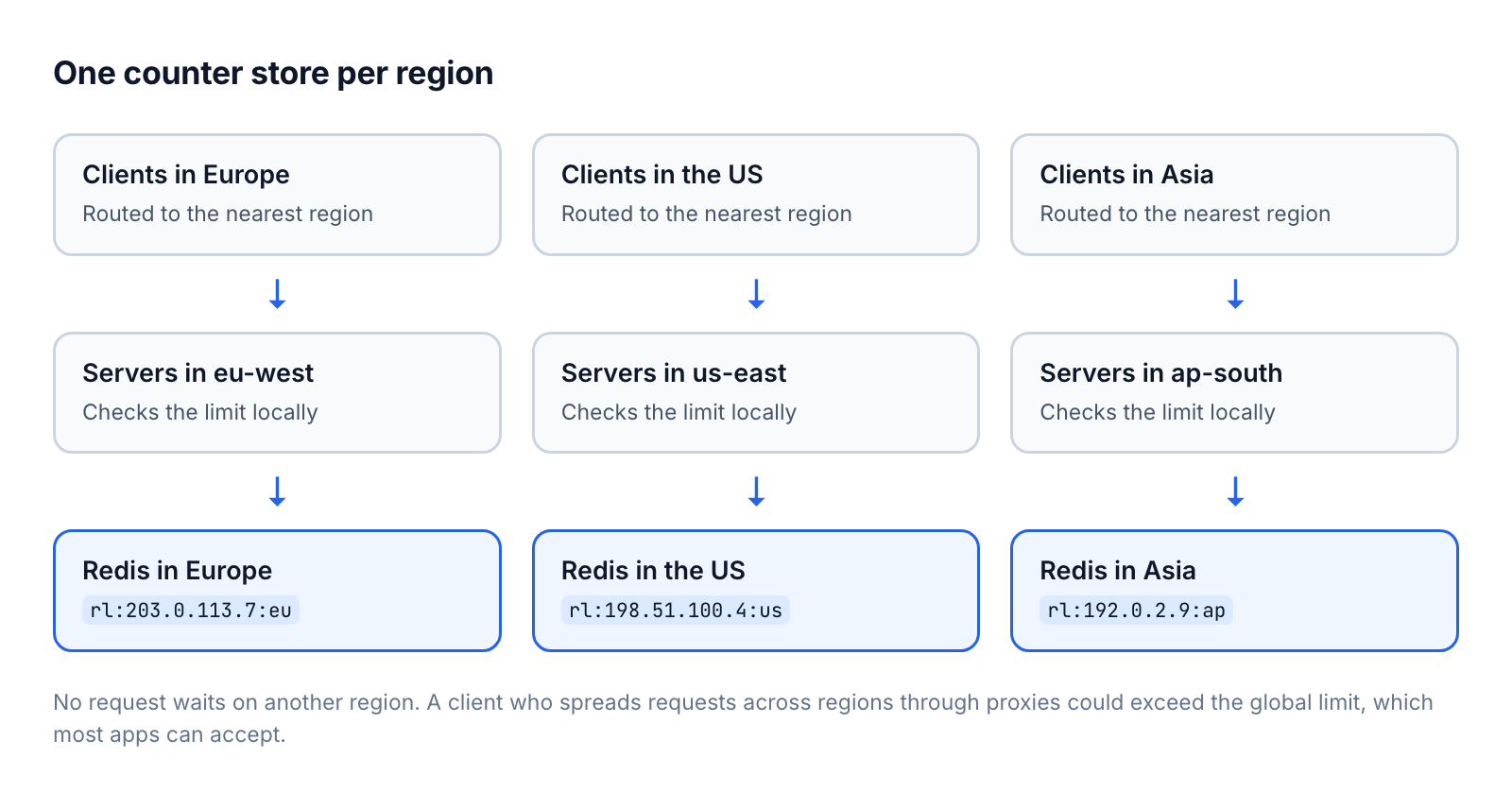
This works because CDNs and anycast routing send each client to the nearest region, so a client's requests usually land in the same place. Someone determined could spread requests across regions through proxies or a VPN and get more than the global limit. For most apps that's acceptable. Where it isn't, keep regional counters for speed and add a slower global counter that syncs in the background.
Choosing your limits
Most APIs need limits at several levels:
| Level | What it protects | Example |
|---|---|---|
| Global | Your whole system from overload | 10,000 requests/second across all clients |
| Per IP | Against anonymous abuse | 10 requests/second |
| Per API key or plan | Fair use, and what customers pay for | Free 100/min, Basic 1,000/min, Enterprise 10,000/min |
| Per endpoint | Expensive operations | 10 exports/hour |
| Login and auth | Against password guessing | 5 failed attempts/minute per account |
Think about the window size as well as the number. Per-second limits catch short bursts, but they mean more counter updates and more chances for distributed counters to drift apart. Per-minute or per-hour windows are cheaper to run and usually protect you just as well. Save per-second limits for the endpoints, or the plans, where they matter.
Best practices
Make limits visible
Publish your limits in your API docs, per plan and per endpoint. Send the rate limit headers on every response. If you can, give clients an endpoint to check their usage that doesn't count against the limit itself.
Degrade before you reject
Rejecting is the bluntest tool. Under load, you can often:
- Serve cached responses for reads
- Queue non-urgent work, like webhooks or exports, for later
- Keep critical requests, like checkout or login, going while limiting everything else
Tell clients how to back off
Clients that retry immediately after a 429 make the spike worse. Ask them to use exponential backoff with jitter: wait about 1 second, then 2, then 4, and so on, up to a cap, with a random extra delay so clients don't all retry at the same moment. In code:
const delay = Math.min(1000 * 2 ** attempt, 60_000)
await sleep(delay + Math.random() * 1000)
If you sent a Retry-After header, clients should wait at least that long.
Test it
Load-test your limits before your customers do. Check that limits apply per endpoint and per plan the way you expect, that normal traffic patterns stay well under them, and what happens when the counter store is slow or down.
Common scenarios
Public APIs
Layer the limits: a per-IP limit for unauthenticated requests (around 10 per second), per-key limits that match each plan (for example 1,000 per hour), and much stricter limits on authentication endpoints.
Login pages
Limit failed attempts per account, around 5 per minute, so nobody can guess one user's password. Add a per-IP limit, around 20 failed attempts per hour, so nobody can try one password against thousands of accounts. Lengthen the delay after each failure, so a script gets slower with every attempt.
Scraping
Scrapers move through pages faster than people, and in patterns people don't follow, like every product ID in order. Limit page views per session, watch for unusual access patterns, and limit requests for assets that don't come with a matching page view.
Conclusion
A good rate limiter comes down to a few decisions: who you count, where you store the counts, which algorithm you use, what you send back, and how you notice when real users get blocked. Start simple, with a fixed window or token bucket in Redis, publish your limits, and watch your 429s. Add regional counters, dynamic limits or edge limiting when your traffic needs them.
If you serve custom domains through SaaS Custom Domains, you can set these limits in our proxy instead of building them into your app.